Local LLMs on a 16 GB GPU: the settings mattered more than the models
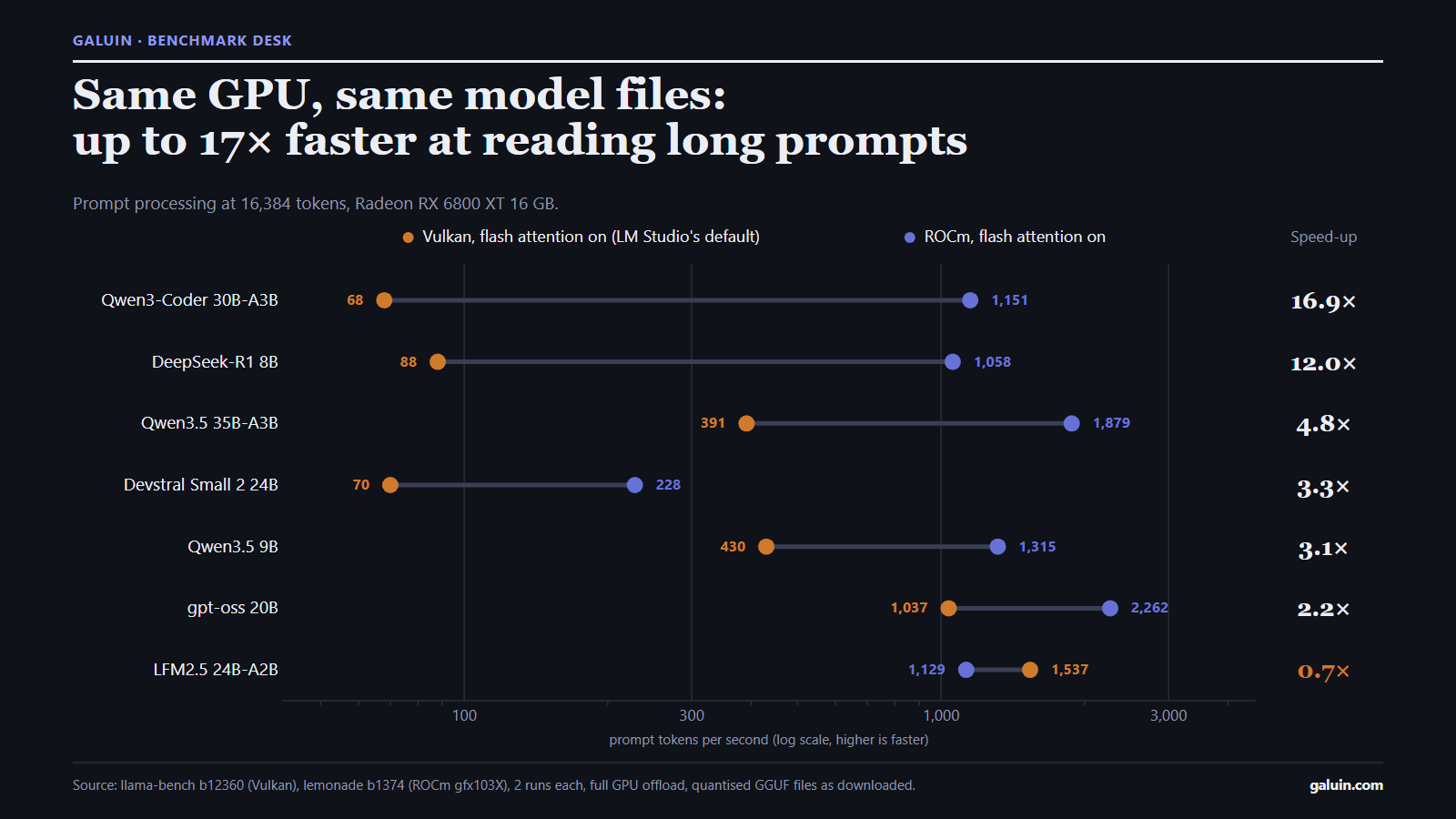
I spent several days benchmarking 13 local language models on one Radeon RX 6800 XT (16 GB). The result surprised me: the model you pick matters less than how you run it. Same GPU, same model files, and the long-prompt speed varied by up to 17×.
What I measured
I wanted to know which model to run for three jobs: agentic coding with OpenCode, chat in Open WebUI, and longer writing. Everything is scored automatically, with no AI judge, at temperature 0:
- Tool calling: 13 cases using OpenCode’s real tool definitions, streaming and not, three repetitions each.
- Agentic coding: 7 small repository tasks (Python, JavaScript, Java, PowerShell) run through headless OpenCode in a sandbox, with a hidden check that either passes or fails.
- General: 35 checkable questions in English, German and Russian: reasoning, format constraints, short code, and fake references a model should refuse to invent.
- Long context: needle-in-a-haystack up to 32k tokens, several needles, and a 40-turn conversation.
- Speed: prompt and generation speed at 1k to 32k tokens of context.
Finding 1: the default settings were the slow path
LM Studio loads models with flash attention switched on. On my GPU, with the Vulkan backend, that crashed some models outright and made prompt processing collapse as the context grew. One 8B model dropped from 295 tokens per second at 1k tokens to 84 at 16k. Switching flash attention off per load fixed the crashes and was my baseline for the LM Studio numbers.
Finding 2: a different runtime beat all of that
AMD’s own ROCm 7.1 for Windows does not see my card (RDNA2 is no longer supported there, and AMD’s own diagnostic tool agrees). A community build of llama.cpp for that GPU family does work, and with flash attention on it was the fastest option for 6 of the 7 models I compared head to head. That is the chart above: 17× on Qwen3-Coder, 12× on DeepSeek-R1 8B, and still 2× on the model that was already quick. The exception is LFM2.5, which reads long prompts faster on Vulkan.
On ROCm, flash attention is required. With it off, long prompts collapse there too, so the two settings only work as a pair.
Finding 3: what I will actually run
For OpenCode and chat I settled on Qwen3.5 35B-A3B in a small IQ3_XXS quantisation, with thinking switched off. Agentic coding: 14 of 14 runs passed, with a median of 20 seconds per task instead of 52 with thinking on. It passed 92% of the tool-calling cases, generates about 100 tokens per second, and got 31 of 35 general questions right.
The runner-up is gpt-oss-20b: 13 of 14 agentic runs at about 125 tokens per second, but only on llama.cpp. LM Studio’s parser failed on its tool calls, and its speed numbers there were wrong because the reasoning is hidden.
What did not help
- Bigger quantisations. The 4-bit files of the 30-35B models are 17.5 GB and do not fit in 16 GB. Generation fell to 25-35 tokens per second with no clear quality gain.
- N-gram speculative decoding. No speed-up in agent use.
- Repeat or presence penalties. They stop reasoning loops in chat but make tool-call JSON worse. Switching thinking off fixed the loops without that cost.
What did help was a quantised KV cache (q8_0) for the two models that did not fit with a 32k context: Qwen3-Coder went from 38 to 105 tokens per second, and its agentic runs got three times faster.
Caveats
These are small samples: one to three repetitions each. Agentic runs are noisy even at temperature 0, and a full rerun of one model went from 12 to 9 of 14. I treat differences up to about 3 of 14 as a tie. I tested the quantised files I had downloaded, not the base models, and the weights behind the use-case scores are my own choice, so change them if your use is different. The agents also had auto-approval inside a sandbox, which a normal interactive session would not.
The harness, the raw results and the scoring code stay on my machine for now. The short version: if you run local models on an AMD card, check the runtime and flash attention before you shop for a bigger model.