Open WebUI on the internet without opening a port: Cloudflare Tunnel and an email gate
I run Open WebUI at home, on the same PC as my local models. It used to be reachable through Tailscale, which was fine for me and awkward for my wife, because it means installing and signing in to another app. I moved the public access to a Cloudflare Tunnel so she can open the chat in a normal browser. The tunnel needs no inbound port on my router, and a Cloudflare Access email list means nobody else even sees the Open WebUI login page. Tailscale stays for private access to the PC itself.
The route
The tunnel is the dashed double arrow. cloudflared opens it from inside, so nothing connects in from outside.
- The browser asks for the hostname. DNS and TLS end at Cloudflare.
- Cloudflare Access looks for a session. Without one it answers with a redirect to its login page, where only the addresses on my list get a one-time code by email. I checked this from outside: an anonymous request gets a
302from Cloudflare itself, with aWww-Authenticate: Cloudflare-Accessheader, and no Open WebUI page. - With a session, the request goes into the tunnel. The tunnel is a set of connections that
cloudflaredopened from my side, and requests ride them back in. The log shows 4 QUIC connections, all to Frankfurt. cloudflaredforwards tohttp://open-webui:8080on the Docker network. A catch-all rule answers 404 for any other hostname.
The tunnel is remotely managed. The ingress rule (hostname to http://open-webui:8080) lives in the Cloudflare dashboard, and the container only needs the tunnel token.
The setup
cloudflared is one more service in the compose file that already runs Open WebUI. The token comes from a .env file next to it that is not in any repository.
  cloudflared:
    image: cloudflare/cloudflared:2025.11.1
    container_name: cloudflared
    command: tunnel --no-autoupdate run
    environment:
      - TUNNEL_TOKEN=${CF_TUNNEL_TOKEN}
    depends_on:
      - open-webui
    restart: unless-stopped
There is no ports: entry. The container only makes outbound connections.
Since Open WebUI is now on the internet, I also tightened it:
      - WEBUI_SECRET_KEY=${WEBUI_SECRET_KEY}
      - ENABLE_SIGNUP=false
      - WEBUI_SESSION_COOKIE_SECURE=true
      - WEBUI_SESSION_COOKIE_SAME_SITE=lax
      - WEBUI_AUTH_COOKIE_SECURE=true
      - WEBUI_AUTH_COOKIE_SAME_SITE=lax
      - CORS_ALLOW_ORIGIN=https://chat.example.com;http://localhost:3000
      - ENABLE_COMMUNITY_SHARING=false
      - ENABLE_VERSION_UPDATE_CHECK=false
      - ANONYMIZED_TELEMETRY=false
On the Cloudflare side there is one Access application on the hostname, with a policy that allows two email addresses (mine and my wife’s) and the one-time PIN login method. Open WebUI’s own login still sits behind that, with signup off, so there are two gates in a row.
What sits behind it
Open WebUI is the front for everything else I run locally, and the tunnel exposes only that one hostname.
Outlined nodes link to the benchmark posts about that part. Everything except the model server runs in Docker.
- The model: llama.cpp on the host, using the GPU. How I picked the settings is in the local LLM benchmark.
- Speech: a small router sends English to Kokoro and German and Russian to Piper. I compared replacements in the TTS benchmark.
- Images: FastSD CPU generates on the CPU, so the GPU stays free for the model. The comparison is in the image generation benchmark.
- Tools: small MCP bridges for my notes, paper search and mail, plus Docling for converting documents.
Does it work end to end
I opened the public hostname in a browser that already had an Access session and sent a short prompt.
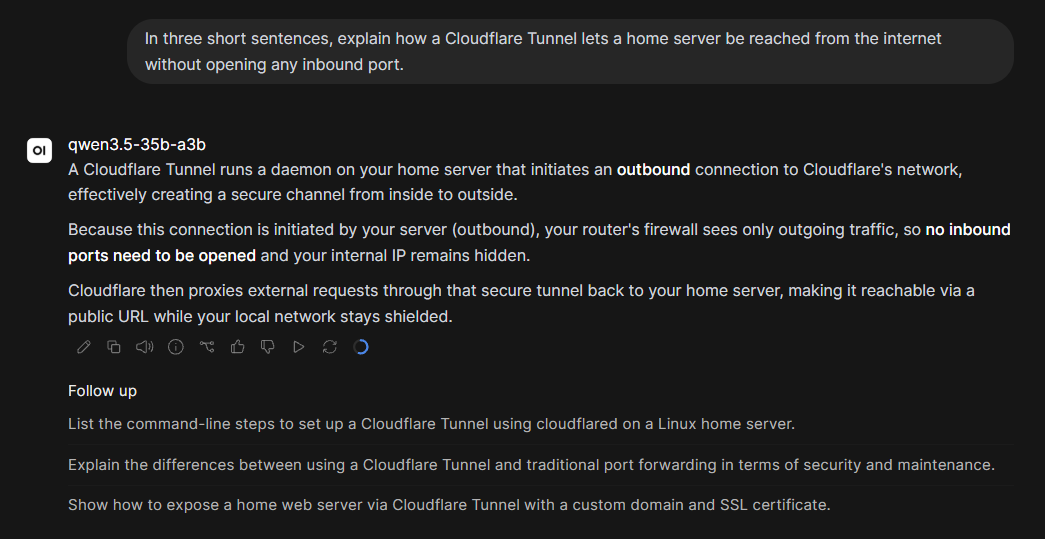
The reply streamed through the tunnel without trouble. For the network cost, I timed /health on the Open WebUI container, 12 requests each, median and range:
| Path | Median | Range |
|---|---|---|
Local, localhost:3000 |
3 ms | 2-23 ms |
| Through the tunnel, from a signed-in browser | 58 ms | 34-88 ms |
| Anonymous request, answered by Access at the edge | 73 ms | 63-109 ms |
The clients differ: the local and anonymous numbers come from a Python script that opens a new connection every time, the tunnel number from a browser that reuses one. So the rows show the order of magnitude, not a precise overhead. The tunnel adds tens of milliseconds, and the edge answers an anonymous request in about 70 ms.
The first reply took 68 s, and none of that was the network. I have a small custom action, Context Card, that adds a button under each reply (circled below) and reads the real token counts and timings from llama-server.
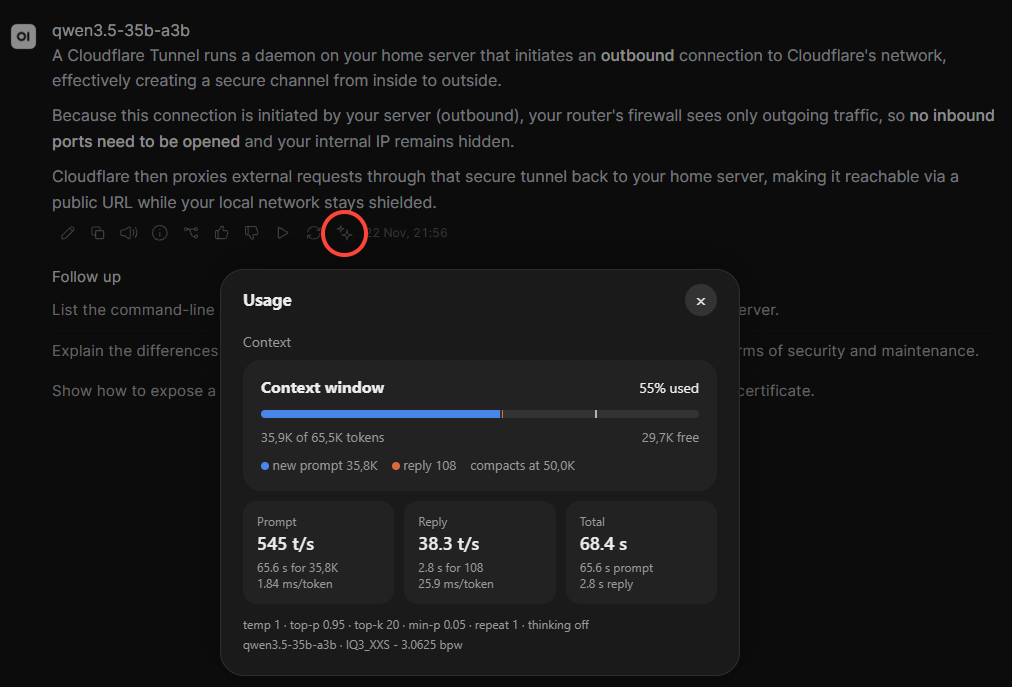
The prompt was 35.8K tokens for a three-sentence question, and processing it took 65.6 s of the 68.4 s. The 108-token reply took 2.8 s. I have not looked into what fills those 35.8K tokens yet. It is a separate problem from the tunnel, but I only noticed it because there was a number to look at.
What I would change
- Published ports. The tunnel does not need any of them, but my compose file still publishes Open WebUI (3000), Kokoro (8880) and Docling (5001) on all host interfaces, so they are reachable from my home network. Binding them to
127.0.0.1is next. The Thunderbird bridge already is. - Tailscale leftover. The CORS list in my compose file still names the old Tailscale address. It is harmless, and I will remove it.
- Not tested. I did not set up rate limits or WAF rules, and I have not tried what a second user sees when the tunnel container is down.
This is one setup on one machine, measured on one evening. The Access policy and the email list are the part I would not skip: the tunnel only hides the port, while Access decides who gets to the login page at all.